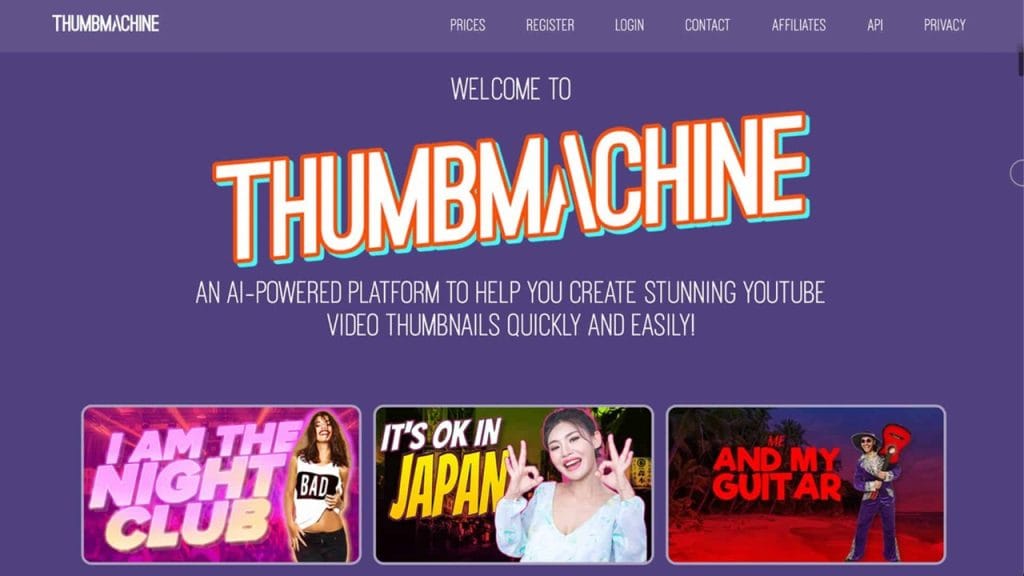
What is Thumbmachine?
In today’s fast-paced digital world, grabbing your audience’s attention within seconds is crucial, especially on platforms like YouTube, Facebook, and Instagram. That’s where Thumbmachine steps in.
Thumbmachine is an AI-powered thumbnail generator designed to help creators, marketers, and brands craft scroll-stopping, high-converting thumbnails without needing advanced graphic design skills. Whether you’re running a YouTube channel, managing social media accounts, or creating online video content, Thumbmachine makes it super simple to create professional-quality thumbnails in just a few clicks.
Its AI engine analyzes your content and automatically suggests thumbnail designs, colors, fonts, and layouts optimized to increase engagement and click-through rates .
Key Features
- AI-Powered Thumbnail Generator
Quickly create eye-catching thumbnails with AI-generated suggestions tailored to your video or image content. - Customizable Templates
Choose from a variety of professionally designed templates you can fully customize — fonts, colors, backgrounds, and more. - Real-Time Preview
Instantly see how your thumbnail will look on YouTube, Facebook, and other platforms with the built-in preview tool . - One-Click Background Removal
Effortlessly remove backgrounds from images to make your thumbnails pop and look clean without needing external tools. - Freemium Pricing Model
Get started for free with basic features, and unlock premium templates, advanced AI tools, and high-resolution downloads with a paid plan .
✅ Pros
- User-Friendly Interface
No design skills needed. The clean, intuitive dashboard makes it easy for anyone to create standout thumbnails in minutes. - Saves Time
Thanks to AI-generated suggestions and one-click editing tools, you can create professional thumbnails much faster than using traditional design software. - Cross-Platform Previews
Ensure your thumbnail looks perfect on YouTube, Facebook, and other platforms before you hit publish. - Affordable Freemium Plan
Unlike many competitors, Thumbmachine offers a generous free version and affordable paid plans, making it accessible for creators of all sizes.
❌ Cons
- Limited Free Features
While the free version is handy, many premium templates and AI options are locked behind the paid tier. - No Mobile App Yet
Currently, Thumbmachine is web-based only — no dedicated mobile app is available, which could be limiting for on-the-go edits.
- Basic Customization Compared to Pro Tools
Although it’s perfect for quick designs, seasoned graphic designers might find its customization options a bit limited compared to full-scale tools like Photoshop or Canva Pro.
Who is Using Thumbmachine?
Thumbmachine has quickly found its way into the workflow of content creators and digital marketers who need to produce sharp, engaging thumbnails without wasting hours on complicated design tools. Its simple, AI-driven features make it appealing to a wide range of users.
- Primary Users: YouTubers, social media managers, digital marketers, vloggers, and online educators.
Use Cases:
- Creating High-CTR YouTube Thumbnails:
YouTube creators use Thumbmachine to generate thumbnails that stand out in crowded feeds, improving their video’s click-through rates and boosting overall channel engagement. - Designing Social Media Post Graphics:
Social media managers rely on the tool to quickly craft engaging visuals for Facebook, Twitter, and Instagram without having to hire a graphic designer or invest time in complex software. - Optimizing Thumbnails for Online Courses and Webinars:
Online educators and coaches use it to create professional-looking thumbnails for their courses, webinar promotions, and video previews to attract more sign-ups and views.
Pricing
Thumbmachine offers a flexible freemium pricing model that caters to both casual creators and professional marketers. While a free version provides access to essential tools, several paid plans unlock additional features for those needing more advanced customization.
- Basic Plan: Free — Includes access to standard templates, AI thumbnail suggestions, and low-resolution downloads.
- Pro Plan: $9.99/month — Offers premium templates, high-resolution downloads, one-click background removal, unlimited thumbnail creation, and priority support.
- Business Plan: $19.99/month — Adds team collaboration features, brand kit management, advanced AI customization options, and priority placement for feature requests.
Note: For the latest pricing details, it’s always best to check the official website.
What Makes Thumbmachine Unique?
Thumbmachine stands out because it takes the guesswork out of thumbnail design. While many graphic design platforms require users to start from scratch or have some creative direction, Thumbmachine’s AI analyzes your content and suggests layouts, fonts, and color schemes optimized for maximum engagement. This not only saves time but also improves the chances of your content performing better on crowded platforms.
Another unique aspect is its real-time cross-platform preview tool, which allows creators to see exactly how a thumbnail will appear on YouTube, Facebook, and other social media sites before publishing. This feature reduces the risk of a thumbnail looking awkward or poorly cropped once it’s live.
Its one-click background removal is another notable feature. Unlike other tools that require multiple steps or paid third-party software, Thumbmachine offers this capability directly within its platform, streamlining the design process even further.
Compatibilities and Integrations
- Integration 1: Canva (Export thumbnails for additional editing if needed)
- Integration 2: YouTube Studio (Direct upload compatible thumbnails)
- Integration 3: Facebook Creator Studio (Easily add thumbnails to scheduled posts and videos)
Hardware Compatibility:
- Compatible with all modern browsers on Windows, macOS, and Linux systems.
- No GPU dependency, runs efficiently on standard consumer-grade hardware.
Standalone Application:
- No, Thumbmachine is currently a web-based tool and does not offer a standalone desktop or mobile app.
Tutorials and Resources of Thumbmachine
Getting started with Thumbmachine is refreshingly easy, thanks to its range of helpful resources. The platform offers a dedicated Help Center on its official website, where users can access detailed guides and FAQs covering everything from basic thumbnail creation to advanced customization options.
For visual learners, Thumbmachine maintains an official YouTube tutorial playlist, showcasing step-by-step walkthroughs, tips for increasing click-through rates, and thumbnail design best practices. Additionally, their blog regularly shares articles about design trends, thumbnail optimization strategies, and content marketing tips.
New users also receive a quick-start guide upon signing up, making it simple to create your first thumbnail within minutes, even without prior design experience.
How We Rated It
Here’s our breakdown of how Thumbmachine performs across key categories:
Category | Rating |
Accuracy and Reliability | ⭐⭐⭐⭐☆ (4/5) |
Ease of Use | ⭐⭐⭐⭐⭐ (5/5) |
Functionality and Features | ⭐⭐⭐⭐☆ (4/5) |
Performance and Speed | ⭐⭐⭐⭐⭐ (5/5) |
Customization and Flexibility | ⭐⭐⭐⭐☆ (4/5) |
Data Privacy and Security | ⭐⭐⭐⭐☆ (4/5) |
Support and Resources | ⭐⭐⭐⭐☆ (4/5) |
Cost-Efficiency | ⭐⭐⭐⭐⭐ (5/5) |
Integration Capabilities | ⭐⭐⭐⭐☆ (4/5) |
Overall Score | ⭐⭐⭐⭐☆ (4.5/5) |
Thumbmachine is a smart, accessible tool for anyone who needs to create high-impact thumbnails without the hassle of complex graphic design software. It’s especially valuable for YouTubers, social media managers, and online educators looking to improve their video visibility and engagement rates.
The tool’s AI-powered suggestions, one-click background removal, and real-time previews make it a standout option in the thumbnail design space. Its freemium pricing ensures that beginners can start without upfront costs, while more serious creators have affordable upgrade options.
The platform shines with its ease of use, reliable performance, and cost-efficiency, although it could benefit from a mobile app and a broader range of integrations. That said, it’s a fantastic solution for creators who prioritize speed, simplicity, and effective design tools tailored for today’s digital platforms.
Would you like me to craft a meta title, meta description, and focus keywords list next to help boost this article’s SEO performance with Rank Math? Just say the word!
Conent