What is Buffer?
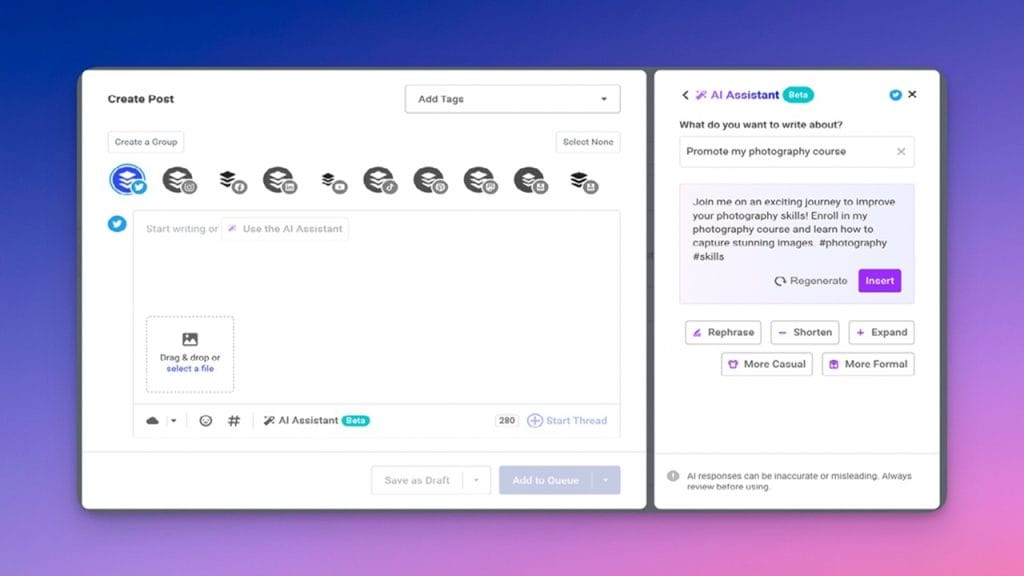
Buffer is an intuitive social media management tool designed to help businesses, content creators, and marketers efficiently manage their social media presence. With Buffer, users can schedule posts, track social media performance, and engage with their audience from a single, user-friendly dashboard. This tool simplifies the complex task of maintaining a consistent online presence across multiple platforms, ultimately saving time and increasing productivity.
Key Features
- Post Scheduling: Buffer allows users to schedule posts across different social media platforms, ensuring content is published at optimal times without needing constant manual intervention.
- Analytics: With Buffer’s built-in analytics, users can monitor the performance of their posts and adjust their strategy based on engagement data.
- Team Collaboration: Teams can work together seamlessly with Buffer’s collaboration features, where multiple team members can plan and execute campaigns without stepping on each other’s toes.
- Social Media Monitoring: Stay on top of brand mentions, relevant hashtags, and competitors with Buffer’s social monitoring tools.
- Content Creation & Curation: Buffer also provides tools for content creation and curation, making it easier to find, share, and create engaging content for your audience.
✅ Pros
- Streamlined Scheduling: Buffer’s easy-to-use scheduling feature helps ensure posts are automatically published, freeing up time for other important tasks.
- Comprehensive Analytics: You can dive deep into the performance of your content, allowing you to make data-driven decisions.
- Team-Friendly: The collaboration tools are great for teams, making it easy to coordinate posts, review campaigns, and track results together.
- Multi-Platform Integration: Buffer supports various platforms like Instagram, Facebook, Twitter, LinkedIn, and Pinterest, all from one dashboard.
❌ Cons
- Limited Features on Free Plan: The free plan offers limited access to some advanced features, which may require a subscription for full functionality.
- Can Be Expensive for Larger Teams: For larger businesses with many social media profiles, Buffer’s pricing may not be ideal due to the costs associated with higher-tier plans.
- Learning Curve for New Users: While the tool is user-friendly, new users may initially struggle to understand all its features and functionalities.
Who is Using Buffer?
Primary Users:
- Social Media Managers: Professionals responsible for managing multiple social media profiles and campaigns for brands or clients.
- Small Business Owners: Entrepreneurs and startups who need an efficient way to schedule and monitor their social media presence without a large marketing team.
- Content Creators: Influencers, vloggers, and bloggers who regularly post to social media platforms and need to plan and manage their content.
- Marketing Teams: Teams of marketers who collaborate to execute large-scale social media campaigns across multiple platforms.
Use Cases:
- Social Media Scheduling: Buffer is used by businesses to schedule social media posts across multiple platforms ahead of time, allowing for consistent content delivery without needing to post manually in real time.
- Campaign Performance Analysis: Buffer’s analytics tools enable users to monitor the performance of their social media posts, helping them adjust strategies based on what’s resonating with their audience.
- Team Collaboration for Social Media Management: Buffer is particularly useful for teams who need to collaborate on content creation and scheduling, making it easy to share access and work together efficiently.
Pricing
- Plan 1: Free Plan – $0
Features: Allows users to manage 3 social accounts with 10 scheduled posts per account. Ideal for individual users or small businesses just starting to manage social media. - Plan 2: Essentials Plan – $6/month
Features: Includes 8 social accounts, 100 scheduled posts per account, and basic analytics tools. This plan is great for growing businesses or individuals looking for more advanced scheduling and tracking. - Plan 3: Team Plan – $12/month
Features: Provides 25 social accounts, 200 scheduled posts per account, team collaboration tools, and advanced analytics. This plan is designed for businesses and teams who need to manage multiple profiles and work together on content creation and strategy.
Note: For the most accurate and current pricing details, refer to the official website.
What Makes Buffer Unique?
Buffer distinguishes itself through its simplicity and user-friendly interface, making it accessible to users of all skill levels. Unlike some competitors with steep learning curves, Buffer is designed to be intuitive and easy to navigate. Its key strengths lie in its powerful post-scheduling capabilities and in-depth analytics tools, which help users not only plan content but also measure its effectiveness. Additionally, Buffer’s ability to integrate with various social media platforms, as well as its focus on team collaboration, makes it a standout choice for businesses and teams that require a smooth, centralized workflow.
Compatibilities and Integrations
- Integration 1: Buffer integrates with major social media platforms like Facebook, Instagram, Twitter, LinkedIn, and Pinterest, allowing users to manage all their accounts from a single dashboard.
- Integration 2: It supports integrations with tools like Zapier, enabling users to automate workflows by connecting Buffer with other apps and services.
- Integration 3: Canva integration allows users to create and edit images for social media directly within Buffer, streamlining the content creation process.
- Hardware Compatibility: Buffer is compatible with both Windows and macOS devices. It also offers mobile apps for iOS and Android, enabling users to manage social media on the go.
- Standalone Application: Yes – Buffer offers a web app, as well as mobile apps for iOS and Android. This flexibility means users can manage social media from virtually anywhere.
Tutorials and Resources of Buffer
Buffer provides an extensive range of resources to help users get the most out of the tool. Their help center is the central hub for all documentation, offering step-by-step guides on setting up an account, managing social media profiles, scheduling posts, and using the analytics features. For more in-depth learning, Buffer also offers video tutorials, which break down the platform’s functionality in an easy-to-follow format.
Additionally, Buffer’s blog is a valuable resource, offering articles, case studies, and expert advice on social media marketing and strategy. Buffer’s customer support team is also readily available to help users with any issues, ensuring that even beginners can navigate the platform smoothly.
How We Rated It
Feature | Rating |
Accuracy and Reliability | 🌟🌟🌟🌟🌟 |
Ease of Use | 🌟🌟🌟🌟🌟 |
Functionality and Features | 🌟🌟🌟🌟 |
Performance and Speed | 🌟🌟🌟🌟 |
Customization and Flexibility | 🌟🌟🌟🌟 |
Data Privacy and Security | 🌟🌟🌟🌟🌟 |
Support and Resources | 🌟🌟🌟🌟 |
Cost-Efficiency | 🌟🌟🌟🌟 |
Integration Capabilities | 🌟🌟🌟🌟🌟 |
Overall Score | 🌟🌟🌟🌟 |
Buffer is a well-rounded tool that offers a user-friendly platform for managing social media accounts. Its straightforward interface, powerful post-scheduling options, and detailed analytics make it an excellent choice for businesses, content creators, and social media managers looking to streamline their social media management. Ideal for small to medium-sized teams, Buffer excels in providing an efficient and collaborative environment. While it might not offer the most advanced features in the market, its simplicity and cost-efficiency make it a solid option for users who prioritize ease of use and reliable performance.