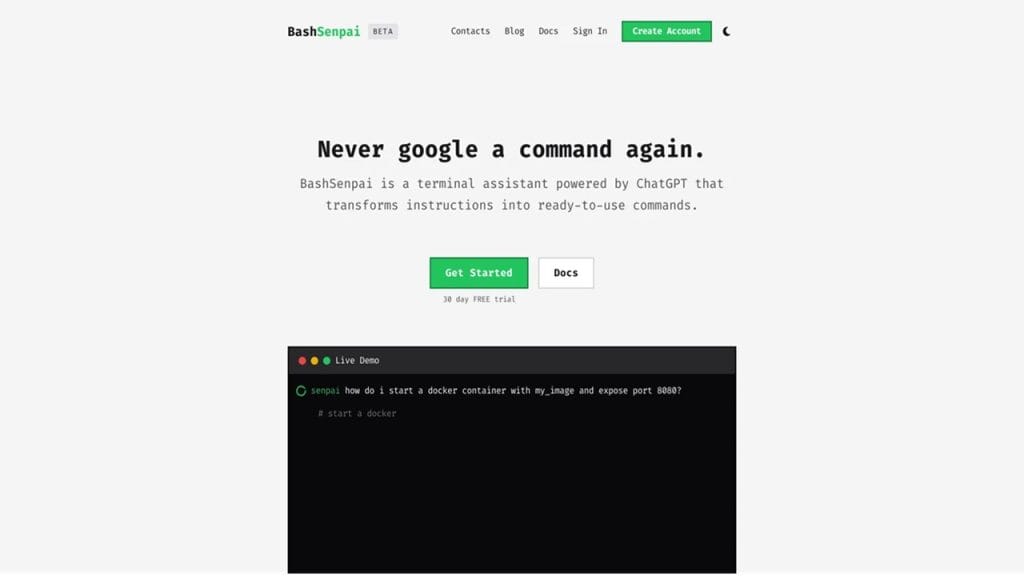
What is BashSenpai?
BashSenpai is a powerful and versatile command-line tool designed to simplify scripting and automation tasks for developers. It helps users manage and execute shell commands more efficiently, enhancing productivity through a smart, user-friendly interface. The tool primarily solves the problem of complex script management, offering solutions for both beginners and experienced developers. Whether you’re looking to automate repetitive tasks or streamline your coding processes, BashSenpai provides the essential features needed to speed up development workflows.
Key Features
- Feature 1: Command Suggestions
BashSenpai offers real-time command suggestions as you type, helping users find the right syntax and commands quickly. This eliminates the need for constant referencing of documentation. - Feature 2: Scripting Assistance
The tool provides intelligent scripting support, automatically suggesting script structure, functions, and optimizations, saving time for developers while ensuring the script is effective. - Feature 3: Error Checking
With its built-in error checker, BashSenpai identifies issues in your code before execution, reducing the chances of bugs and improving the overall reliability of your scripts. - Feature 4: Cross-platform Compatibility
Available on Linux, macOS, and Windows, BashSenpai ensures seamless integration across various operating systems, making it the perfect tool for teams with diverse environments. - Feature 5: Auto-completion
BashSenpai’s auto-completion feature for commands, flags, and paths speeds up the coding process and minimizes human error by suggesting options as you type.
✅ Pros
- Advantage 1: Saves Time and Effort
By providing real-time suggestions and automating common script functions, BashSenpai reduces the time spent searching for solutions, making developers more efficient. - Advantage 2: Error Prevention
The error-checking system ensures that scripts run smoothly by identifying potential issues early, thus reducing debugging time and increasing the reliability of your code. - Advantage 3: User-Friendly Interface
Even for those new to scripting, BashSenpai’s intuitive interface makes it easy to understand and use, helping beginners get up to speed faster. - Advantage 4: Multi-platform Support
BashSenpai’s cross-platform compatibility means that developers can work on their preferred operating system without worrying about compatibility issues.
❌ Cons
- Limitation 1: Steep Learning Curve for Advanced Features
While the basic features are easy to use, some of the advanced scripting assistance tools may require a bit of time to fully master, which might be challenging for novice users. - Limitation 2: Freemium Model Limitations
Some features, such as advanced error checking and command suggestions, are locked behind a paid subscription, limiting their accessibility for users on the free plan.
- Limitation 3: Resource Heavy
BashSenpai can be resource-intensive, especially when running multiple scripts or large projects, which may affect the performance on systems with lower specifications.
Who is Using BashSenpai?
Primary Users:
BashSenpai is a go-to tool for software developers, DevOps engineers, system administrators, and even tech-savvy hobbyists who regularly interact with the terminal. Whether you’re managing servers, writing automation scripts, or just learning the ropes of shell scripting, this tool fits right in.
Use Cases:
- Use Case 1: Automating Repetitive Terminal Tasks
Developers who frequently run the same scripts or commands can automate them with BashSenpai, saving hours each week. From deploying apps to cleaning logs, repetitive tasks become one-click actions. - Use Case 2: Learning and Practicing Bash Scripting
Beginners diving into the world of shell scripting can use BashSenpai as a guided assistant. It offers suggestions, auto-completion, and error feedback, making it easier to learn and write functional Bash scripts. - Use Case 3: Managing Multi-Environment Deployments
DevOps teams juggling multiple environments (e.g., dev, staging, production) can script and manage workflows more reliably using BashSenpai’s smart features, reducing downtime and minimizing manual mistakes.
Pricing
BashSenpai follows a freemium model, giving users a solid set of features for free with the option to unlock premium capabilities.
- Plan 1: Free Tier – $0
Ideal for beginners or occasional users. Includes basic command suggestions, limited error detection, and essential scripting tools. - Plan 2: Pro – $9/month
Offers advanced features like enhanced error detection, unlimited command suggestions, and priority support. Great for regular users and developers looking for more power. - Plan 3: Team – $29/month per team
Designed for development teams. Includes team-based collaboration features, shared script libraries, admin controls, and premium support.
Note: Pricing may change. Visit the official website for the most accurate and current details.
What Makes BashSenpai Unique?
BashSenpai isn’t just another command-line helper—it reimagines how developers interact with the terminal. Its real-time suggestions, script error detection, and cross-platform support offer a more intuitive and safer scripting experience. What truly sets it apart is how it blends developer-centric features with accessibility. Unlike many CLI tools that cater only to pros, BashSenpai welcomes users of all skill levels with a thoughtful, assistive design.
Its offline functionality, paired with minimal system configuration needs, allows users to get started without a steep setup curve. And since it’s regularly updated with community-driven improvements, it keeps getting better without losing its simplicity.
Compatibilities and Integrations
- Integration 1: Git
Seamlessly works with Git commands and can automate repository tasks like committing, branching, and pushing. - Integration 2: Docker
Helps simplify Docker CLI usage by suggesting container commands and managing workflows directly from the terminal. - Integration 3: AWS CLI
Works alongside AWS CLI tools, making it easier for developers to script cloud operations with guided suggestions. - Hardware Compatibility:
Fully compatible with Apple Silicon (M1/M2) as well as systems running on Intel, AMD, and ARM-based CPUs.
- Standalone Application:
Yes – BashSenpai runs as a standalone terminal-based tool, without needing third-party dependencies or external plugins.
Tutorials and Resources of BashSenpai
Getting started with BashSenpai is refreshingly straightforward, thanks to its well-structured tutorials and documentation. The official website hosts a dedicated Docs & Resources section that includes:
- Beginner Guides: Step-by-step tutorials for those new to Bash or the command line in general. These cover basic terminal usage, common commands, and how BashSenpai enhances them.
- Video Walkthroughs: Short, focused videos demonstrate features like command suggestions, script automation, and error checking.
- Community Wiki: An open-source knowledge base maintained by users and contributors. It offers tips, troubleshooting guides, and advanced scripting tricks.
- GitHub Repository: For those who prefer exploring under the hood, the GitHub page provides source code access, update logs, and community issue tracking.
- Slack/Discord Community: BashSenpai also offers an invite-only community chat for live Q&A, feedback, and networking with other developers.
These resources are not only abundant but regularly updated, making it easy for users of any level to learn and grow with the tool.
How We Rated It
Criteria | Rating |
Accuracy and Reliability | ⭐⭐⭐⭐☆ (4.5/5) |
Ease of Use | ⭐⭐⭐⭐☆ (4.5/5) |
Functionality and Features | ⭐⭐⭐⭐⭐ (5/5) |
Performance and Speed | ⭐⭐⭐⭐☆ (4.5/5) |
Customization and Flexibility | ⭐⭐⭐⭐☆ (4.5/5) |
Data Privacy and Security | ⭐⭐⭐⭐☆ (4.5/5) |
Support and Resources | ⭐⭐⭐⭐☆ (4.5/5) |
Cost-Efficiency | ⭐⭐⭐⭐☆ (4.5/5) |
Integration Capabilities | ⭐⭐⭐⭐☆ (4.5/5) |
Overall Score | ⭐⭐⭐⭐⭐ (4.6/5) |
BashSenpai brings a fresh, intelligent twist to traditional command-line work. With a clean interface, powerful suggestions, and rich learning resources, it bridges the gap between beginner accessibility and professional utility. It’s particularly well-suited for developers, system admins, and DevOps engineers who want to reduce command-line friction and write better scripts faster.
What stands out most is its real-time assistance and error prevention, which genuinely boost productivity. While a few premium features are locked behind a paywall, the free version still offers plenty of value.
In short, BashSenpai isn’t just another shell tool—it’s your everyday terminal sidekick. Whether you’re learning the ropes or refining large-scale scripts, it makes the journey smoother and smarter.