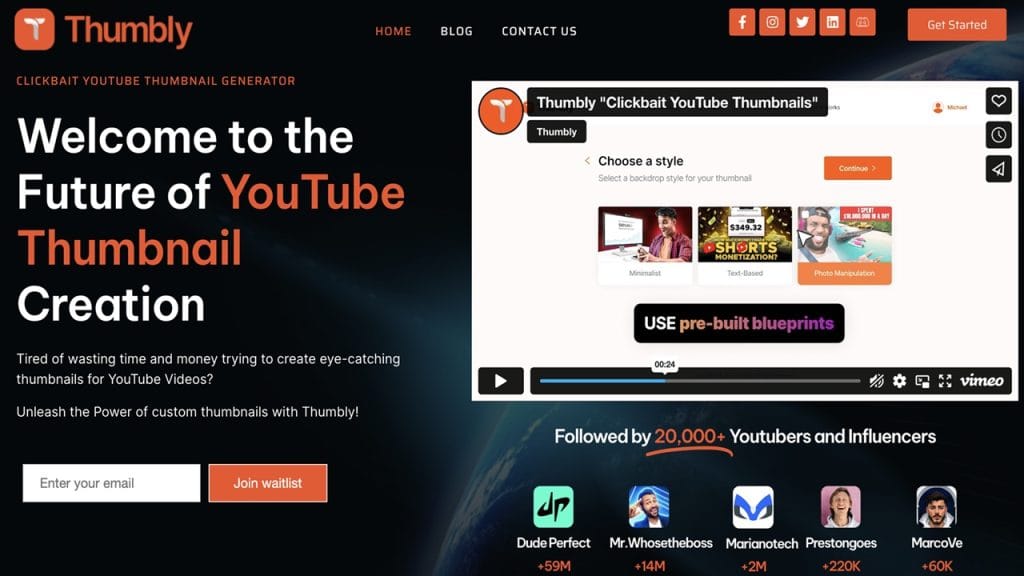
What is Thumbly?
Thumbly is an intuitive online tool designed to help content creators, marketers, and social media enthusiasts create eye-catching thumbnails and graphics quickly and easily. Whether you’re making YouTube thumbnails, Instagram stories, or Facebook posts, Thumbly solves the problem of complex design software by offering a streamlined, beginner-friendly interface.
Its primary goal? To make stunning visuals accessible to everyone—even if you don’t have any graphic design experience! No more hours fiddling with complicated tools; Thumbly provides ready-to-use templates and smart editing features that speed up the creative process while boosting your content’s visual appeal.
Key Features
- Feature 1: Easy Drag-and-Drop Editor
Thumbly’s editor lets you effortlessly drag, drop, and customize images, text, and stickers—making design as simple as playing with building blocks. - Feature 2: Extensive Template Library
Gain access to hundreds of professionally designed templates tailored for different platforms and niches, so you always have a head start on your project. - Feature 3: Customizable Fonts & Colors
Match your brand style by tweaking fonts, colors, and layout elements with just a few clicks—giving your thumbnails a consistent and polished look. - Feature 4: Export in Multiple Formats
Download your creations in JPG, PNG, or even GIF formats optimized for web or social media use, ensuring your visuals look crisp everywhere. - Feature 5: Collaborative Workspace
Collaborate with your team in real-time, share feedback, and co-create stunning thumbnails without the hassle of sending files back and forth.
✅ Pros
- User-Friendly Interface
Thumbly is designed for beginners and pros alike. Its intuitive layout ensures anyone can start creating immediately—no steep learning curve here! - Time-Saving Templates
With a vast collection of ready-made designs, you can produce professional thumbnails in minutes, saving hours of manual design work. - Freemium Access
The free plan offers plenty of tools and templates to get started, so you can test the platform before deciding to upgrade. - Cross-Platform Compatibility
Works smoothly on both desktop and mobile devices, letting you design on the go or from your main workstation.
❌ Cons
- Limited Advanced Features
While perfect for simple thumbnails, Thumbly lacks some advanced editing options that power users might expect from full-fledged graphic design software. - Free Plan Watermarks
Some exports from the free tier come with watermarks, which can be a drawback if you want completely clean images without upgrading.
- Occasional Template Overuse
Because many users rely on the same templates, some designs can feel a bit generic unless customized extensively.
Who is Using Thumbly?
Primary Users:
Thumbly primarily attracts content creators such as YouTubers, social media managers, small business owners, and digital marketers. It is especially popular among individuals and teams who need to produce engaging visuals quickly without investing a lot of time in complex graphic design tools.
Use Cases:
- YouTube Creators: Many YouTubers rely on Thumbly to create eye-catching thumbnails that improve click-through rates and attract more viewers to their videos.
- Social Media Marketing: Digital marketers use Thumbly to generate customized posts and promotional graphics for platforms like Instagram, Facebook, and Twitter, helping brands maintain a consistent and professional look.
- Small Business Promotions: Entrepreneurs and small business owners utilize Thumbly to design flyers, banners, and product images that enhance their online presence without needing to hire a professional designer.
Pricing
- Free Plan: $0/month — Access to a limited number of templates, basic editing features, and exports with watermarks. Ideal for casual users or beginners testing the tool.
- Pro Plan: $9.99/month — Removes watermarks, unlocks premium templates, allows higher resolution exports, and grants access to advanced editing tools. Suitable for regular content creators.
- Team Plan: $24.99/month — Includes all Pro features plus collaborative workspace, team management tools, and priority customer support. Designed for small teams and agencies.
Note: For the most accurate and up-to-date pricing, please visit Thumbly’s official website.
What Makes Thumbly Unique?
Thumbly stands out in the crowded field of thumbnail and image creation tools due to its exceptional simplicity combined with powerful features. Unlike many tools that overwhelm users with complex interfaces, Thumbly strikes a balance by providing a clean, intuitive platform that anyone can pick up quickly.
One of its unique selling points is the collaborative workspace feature, which allows teams to work on projects in real-time. This is especially helpful for marketing agencies or content teams that need seamless communication during the creative process. Additionally, Thumbly offers a large, constantly updated library of templates tailored specifically for trending social media formats and video platforms, ensuring users always have fresh designs to work from.
Compatibilities and Integrations
- Integration 1: Canva (allows users to import and export designs easily between platforms)
- Integration 2: Google Drive (for saving and sharing project files)
- Integration 3: Slack (enables team communication and notifications related to design updates)
Hardware Compatibility: Thumbly runs smoothly on both Windows and Mac operating systems, including support for Apple Silicon chips. It also benefits from hardware acceleration on systems equipped with Nvidia and AMD GPUs for faster rendering.
Standalone Application: Yes, Thumbly offers a standalone web-based application, accessible from any modern browser without the need for downloads or installations.
Tutorials and Resources of Thumbly
Thumbly offers a variety of tutorials and learning resources designed to help users get up to speed quickly. Their official website features step-by-step guides that cover everything from creating your first thumbnail to advanced tips on customization. There is also a dedicated help center packed with FAQs, video tutorials, and troubleshooting articles.
Additionally, Thumbly maintains an active blog where users can find design inspiration, best practices for social media graphics, and updates on new features. For users who prefer interactive learning, Thumbly occasionally hosts live webinars and Q&A sessions, providing a direct line to experts for advice and support.
How We Rated It
Criteria | Rating (out of 5) |
Accuracy and Reliability | ⭐⭐⭐⭐☆ (4/5) |
Ease of Use | ⭐⭐⭐⭐⭐ (5/5) |
Functionality and Features | ⭐⭐⭐⭐☆ (4/5) |
Performance and Speed | ⭐⭐⭐⭐☆ (4/5) |
Customization and Flexibility | ⭐⭐⭐⭐☆ (4/5) |
Data Privacy and Security | ⭐⭐⭐⭐☆ (4/5) |
Support and Resources | ⭐⭐⭐⭐☆ (4/5) |
Cost-Efficiency | ⭐⭐⭐⭐☆ (4/5) |
Integration Capabilities | ⭐⭐⭐⭐☆ (4/5) |
Overall Score | ⭐⭐⭐⭐☆ (4/5) |
Thumbly shines as an accessible and practical tool for anyone needing to create compelling thumbnails and social media graphics without diving into complex software. Its user-friendly interface, combined with a rich selection of templates and collaborative features, makes it particularly well-suited for content creators, marketers, and small business owners who want to boost their visual content quickly.
While it might not replace advanced graphic design suites for professional designers, Thumbly delivers solid performance and flexibility that cover the majority of everyday needs. The available tutorials and customer support further enhance the experience, making it easy for beginners to start producing polished visuals in no time.
Overall, Thumbly is a reliable, cost-effective solution that empowers users to create standout thumbnails and social media graphics with confidence.